Connect to AWS compute
A ComputeContext describes the compute Polars Nanook starts in your AWS account for remote
queries. When a query runs against it, Polars Nanook launches that hardware as a compute cluster and
stops it again after its idle timeout. Connect the AWS account first, as described in
Set up AWS.
Compute context definition
A compute context takes its hardware from the workspace default, from minimum CPUs and memory, or
from an exact instance type. Unset storage and cluster_size come from the workspace defaults.
The API reference
lists every argument. Compute labels must already exist in the
workspace.
Workspace default
A ComputeContext that sets none of cpus, memory and instance_type takes its hardware
requirements from the workspace defaults. A workspace admin must set them first, as described in
Workspace compute defaults.
import polars_nanook as pn

ctx = pn.ComputeContext(workspace="My workspace")
Minimum CPUs and memory
Set cpus and memory, and optionally storage. cpus and memory are lower bounds: AWS
launches the lowest-priced current-generation x86 instance type without local storage that meets
both.
import polars_nanook as pn

ctx = pn.ComputeContext(
    workspace="My workspace",
    memory=8,
    cpus=2,
)
Exact instance type
instance_type names the exact instance type Polars Nanook launches. Use it when a production
environment needs specific hardware.
import polars_nanook as pn

ctx = pn.ComputeContext(
    workspace="My workspace",
    instance_type="m7i.xlarge",
    cluster_size=2,
)
This launches two m7i.xlarge instances. Replace the type with one sized for your data:
Scale a query covers how to measure what a query needs.
For a query that shuffles or spills more data than fits in memory, choose a type with local NVMe
storage, such as m8id.xlarge. Without local NVMe, as with m7i.xlarge or a type picked from
cpus and memory, this data goes to one gp3 volume at the AWS default throughput of 125 MiB/s.
Applying a compute context
A defined compute context applies to queries in three ways:
-
Passed directly to the remote query:
query.remote(context=ctx).collect() -
Set globally once, so that no
remotecall needs it:pn.set_compute_context(ctx) query.remote().collect() -
Taken from the workspace default, in which case no compute context is defined in the script:
query.remote().collect()
Idle timeout
A compute cluster keeps running after a query finishes and stops after idle_timeout_mins minutes
without queries. Without the argument, the workspace default applies. It is 60 minutes unless a
workspace admin changes it under
Workspace compute defaults. The minimum is 10
minutes.
import polars_nanook as pn

ctx = pn.ComputeContext(
    workspace="My workspace",
    cpus=4,
    memory=16,
    idle_timeout_mins=30,
)
ctx.stop() stops the cluster without waiting for the timeout. Used as a context manager
(with pn.ComputeContext(...) as ctx:), the context is the default context inside the block, the
first query starts the cluster, and the cluster stops when the block exits.
Reuse a running cluster
A client can reconnect to a running compute cluster and send more queries without waiting for new machines to start.
Reconnection by manifest name
A manifest saves the settings of a compute context under a unique name, so scripts do not repeat them and several people can share one running compute cluster. Each manifest has at most one running cluster, so starting a manifest that is already running reconnects to that cluster instead of starting a new one. This is the recommended way to reconnect.
Create a manifest in the Compute tab of the portal, or call .register("ManifestName") on a
ComputeContext:
import polars_nanook as pn

ctx = pn.ComputeContext(workspace="My workspace", cpus=4, memory=16)
ctx.register("ManifestName")

# On another process / machine
ctx = pn.ComputeContext(workspace="My workspace", name="ManifestName")
ctx.start()
A ComputeContext started by manifest name takes no settings other than the workspace. It fails
when the locally installed Polars or Python version differs from the version recorded in the
manifest. Install the recorded version, or change it with Edit manifest in the Compute tab.
Reconnection by compute ID or interactively
pn.ComputeContext.connect(compute_id) reconnects to any running cluster in the workspace, for
example after a lost connection. print(ctx) on the ComputeContext that started the cluster shows
its ID:
ComputeContext(id=0198e107-xxxx-xxxx-xxxx-xxxxxxxxxxxx, cpus=4, memory=16, ...)
pn.ComputeContext.list("My workspace") lists every compute cluster of the workspace with its ID
and status:
import polars_nanook as pn

# List all clusters in the specified workspace
print(pn.ComputeContext.list("My workspace"))
[(ComputeContext(id=0198e107-..., cpus=4, memory=16, ...),
  RUNNING),
 (ComputeContext(id=0198e0f2-..., cpus=2, memory=8, ...),
  STOPPED)]
Connect with the ID:
import polars_nanook as pn

ctx = pn.ComputeContext.connect("0198e107-xxxx-xxxx-xxxx-xxxxxxxxxxxx")
When the ID is unknown, .select() opens an interactive interface that lists the available
clusters:
import polars_nanook as pn

# Interactive interface to select the compute cluster you want to (re)connect to
pick_ctx = pn.ComputeContext.select()
Found 1 available clusters:
-----------------------------------------------------------------------------------------------------------------------------
#   Workspace       Type         vCPUs    Memory     Storage    Size       Runtime    ID
-----------------------------------------------------------------------------------------------------------------------------
1   My workspace    Unknown      4        16 GiB     16 GiB     1          14m        0198e107-...
list() and select() also show clusters you run that are registered in the workspace, but a
ComputeContext cannot connect to them. Use a cluster context for those.
Proxy mode
By default the client connects to the compute cluster directly. Proxy mode routes queries through the Polars control plane instead, for compute that must not accept inbound connections. The compute cluster polls the control plane for queries and reports back to it, so it needs only outbound network access.
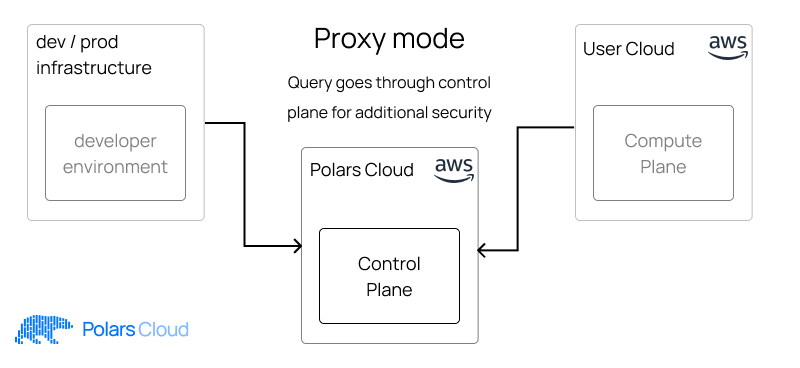
Set connection_mode="proxy" on the ComputeContext:
import polars_nanook as pn

ctx = pn.ComputeContext(
    workspace="My workspace",
    cpus=4,
    memory=16,
    connection_mode="proxy",
)
Set up AWS describes the security group of a cluster started in proxy mode.
Some calls read from the cluster directly and do not work in proxy mode: QueryResult.graph,
QueryResult.plan and QueryResult.delete raise an error, and .collect(), .collect_batches()
and calls that only plan a query without executing it, such as show_graph(), need a direct
connection.