Install with the Helm chart
The Helm chart polars-inc/polars, from the
polars-inc/helm-charts repository, runs Polars Nanook
on any CNCF-conformant Kubernetes cluster. Chart and cluster software versions are on the
Releases page.
Resources created by the Helm chart
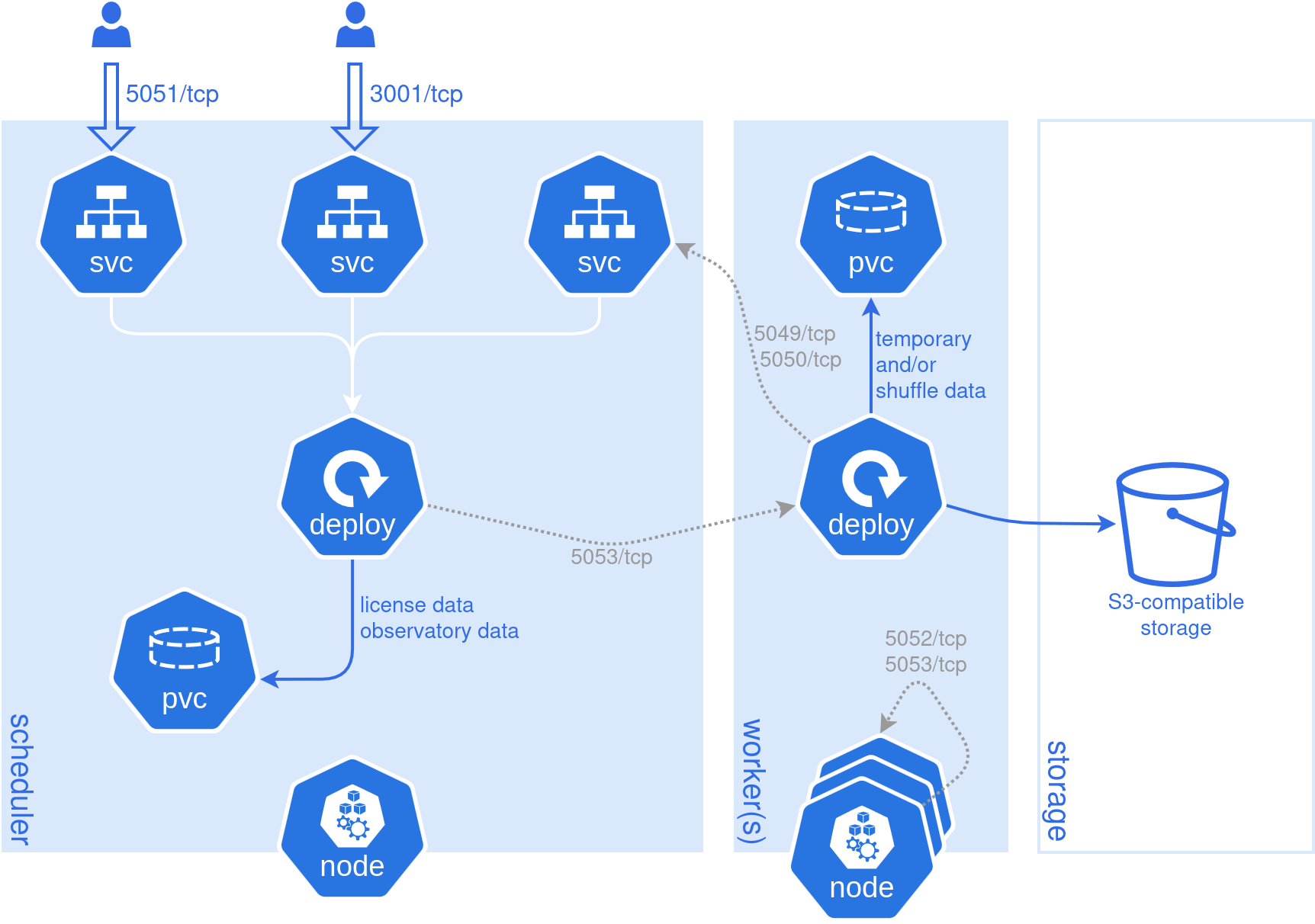
Each Helm deployment creates the Kubernetes objects shown in the diagram. The persistent volume claims and the S3-compatible storage are optional:
Connection to the Polars control plane
A connected cluster syncs with the Polars control plane.
Security and data boundaries
lists what the cluster sends and why. The cluster authenticates and registers through a
service account of the workspace. Its client ID and
secret go under license.onPrem, together with the workspace ID.
Note
A Polars Nanook service account is an identity managed within Polars Nanook only. It is distinct from a Kubernetes service account object, such as the one the scheduler and worker pods use for cloud storage access with workload identity.
Install
Add the chart repository:
helm repo add polars-inc https://polars-inc.github.io/helm-charts
helm repo update
Write the cluster ID and the license to a values file, values.yaml. clusterId identifies the
cluster and defaults to the Helm namespace and release name. The workspace ID and the service
account credentials go under license.onPrem (workspaceId, clientId, clientSecret). The
portal prefills all of these values during setup.
clusterId: "prod-eu-1"
license:
  onPrem:
    enabled: true
    workspaceId: <WORKSPACE_ID>
    clientId: <CLIENT_ID>
    clientSecret: <CLIENT_SECRET>
Add the settings below to the same file, then install the chart:
helm upgrade --install polars polars-inc/polars -f values.yaml
Once all pods show a Running status, the cluster is registered with the control plane and ready to
accept queries:
kubectl get pods
Production configuration
The Helm chart documentation lists all configurable options. The main settings to review for production:
- Expose the scheduler and observatory: LoadBalancer and TLS.
- Result storage: where stored results go.
- Shuffle storage: where intermediate data between workers is stored.
- Worker resources and memory: worker pod sizing and placement, and the out-of-memory behavior on cgroup v2 clusters.
- Checkpointing.
- Monitoring and query history: persist the observatory database.
- Cloud storage access: the service account the pods run as, bound to a cloud identity on EKS, GKE or AKS.
Worker image
Workers run queries in a Python environment with the polars release the cluster is pinned to,
cloudpickle and the packages the queries need. By default, the
chart composes this environment when a worker starts, from the Polars distribution image and a
Python base image (runtime.composed.runtime). A setup script installs the Polars wheel with the
extras in polarsExtras, which must include cloudpickle, and the packages in requirements:
runtime:
  composed:
    requirements: |
      numpy==2.2.4
      polars-xdt==0.16.8
The setup script runs at every worker start and needs internet access, so an air-gapped cluster
brings the packages in its own image instead. System libraries, such as libgssapi-krb5-2 for
HDFS with Kerberos, must already be in the image, because the setup script
installs only Python packages.
To use your own image, build one with Python, Polars and the packages. Set its repository and
tag under runtime.prebuilt.runtime, set runtime.prebuilt.enabled: true, and set
runtime.composed.enabled: false, since runtime.composed and runtime.prebuilt are mutually
exclusive. The
Runtime section of the
Helm chart documentation has an example Dockerfile.